x





Somewhere this week, a founder sat down with a stack of receipts and typed each one into a spreadsheet, line by line, like it's 2015. Someone else copy-pasted a table out of a PDF and spent ten minutes fixing the columns that came across as soup. A third photographed a whiteboard after a planning session and then — later, wearily — transcribed it by hand.
All three paid a tax that no longer exists. Modern AI tools read images properly: not just the words, but the structure — rows, columns, totals, labels. The retyping era is over; the news just hasn't reached everyone's Tuesday yet.
The decoded idea: a photograph is now a data entry. If information is trapped somewhere structured-but-unusable — paper, PDF, whiteboard, screenshot — the fastest route to a spreadsheet is through the camera, not the keyboard. Sixty seconds of capture-and-ask replaces the least loved half-hour in a founder's admin.
The practical move: the three-step lift. Snap or screenshot the source. Drop the image into your AI tool. Then ask for exactly the shape you want:
"Turn this into a table with columns: date, vendor, item, amount, VAT. One row per line item. Flag anything you can't read clearly instead of guessing. Then give me the column totals."
That last sentence — flag, don't guess — is the difference between a tool and a liability, so keep it in every version of the prompt. Where it works best: expense receipts before your bookkeeping day; tables locked inside supplier PDFs; whiteboards at the end of a planning session; the pricing grid on a competitor's site you'd rather analyse than admire. Batch it — ten receipts in one go beats ten separate asks — and export straight to your sheet.
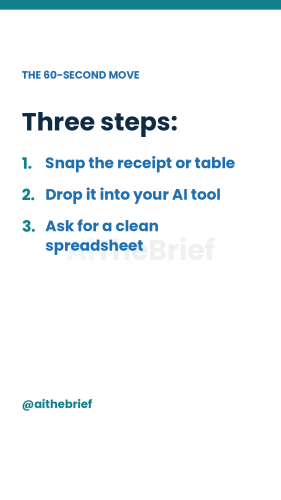
From this week's video of the week — the full demo below.
The responsible-AI note (vet → disclose → verify). This workflow lives or dies on the verify step. Vision models are excellent and imperfect: an 8 becomes a 3, a subtotal gets read as a total, a faded line gets confidently invented. So the non-negotiable rule — check the totals against the source before anything is filed. If a number's off, re-ask in smaller chunks (one receipt at a time reads better than a collage). Mind the data, too: receipts and invoices carry names and account details, so use a tool whose data policy you've actually vetted, with training off — and never photograph documents you wouldn't email. We tested this on a month of receipts; it beat manual entry comfortably with the checking time included. Without the checking, it wouldn't deserve to.
Where founders get this wrong. Trusting the first pass — the output looks so clean that scepticism evaporates; clean formatting is not accuracy. Feeding it chaos — a blurry photo of three overlapping receipts yields creative fiction; flat, well-lit, one document per shot. And using it for judgement — the lift gets data into the sheet; deciding what the numbers mean is still Saturday's job (see this week's reset ritual).
What this looks like after a month. Expense day shrinks from an evening to a coffee. Data that used to die in PDFs — supplier price lists, old statements — becomes queryable. And you develop the habit that actually compounds: seeing any trapped table and thinking "that's sixty seconds", which quietly removes one more reason the admin pile wins.
One decoded AI move, every week. Follow @aithebrief on Instagram for the daily version, or subscribe free on Substack for the deep one.