



x
Black Bar Banner 1
x

NEW: About Me Look — turn on a full-width dark About Me from your profile Configuration (Profile Page Upgrade). The Academy, profile feeds and Media Feed now read like the News Feed. See Subscriptions »

New: AI Blog Autopilot — free for the next 30 days. Switch it on by November 15th »

NEW: Smart Mail is live — free for every member. Send broadcasts, build lists and run autoresponders. Open Smart Mail »

New training: The Campaign Map. Watch it now »

A+ A−
Ads by Markethive - View All
The Blog Feed
The Blog Feed
» Blog Feed
Write a New Blog Post
Search Blog Status
Most Viewed
Most Recent
Most Shared
Alphabetical
Markethive Blog (default)
My Blog Posts
Friends' Blogs
Blog Categories
All
Advertising
Blockchain & Cryptocurrency
Business Development
Diet & Weight Loss
Environmental
Health and Wellness
History and Culture
Home and Garden
Marketing
Mentoring & Training
Money & Finance
Other
Political
Prayer & Religion
Programming & Technical
Real Estate
Search Engine Optimization
Social Media
Spirituality
Sports & Recreation
Transport
Travel & Events
Website Design
Blogging Tools & Assets
My Blog Info
Members Subscribed to You
Blogs You Are Subscribed To
Website Widget
Wordpress Plugin
Subscribe for Greater Services
Subscribe to one of many subscriptions, each one includes the previous ones.. Unlock powerful tools, advance features, to build a powerful reach.

Picture Guide 3: Your Own Blog - write it, picture it, publish it

Posted by Christopher Corey on September 01, 2026 - 4:24am


PICTURE GUIDES · THE BLOG SYSTEM · THE HIVE ACADEMY

Your Own Blog — write it, picture it, publish it

Seven little steps. Real pictures of the real screen. The red ring shows you exactly where to click.

Hi, I'm Chris — the Chief Technology Officer here at MarketHive. Here's something most members don't know: MarketHive gives you a real blog. Not a post that disappears down a feed — a web page with your name on it that search engines can find. This guide shows you how to use it.

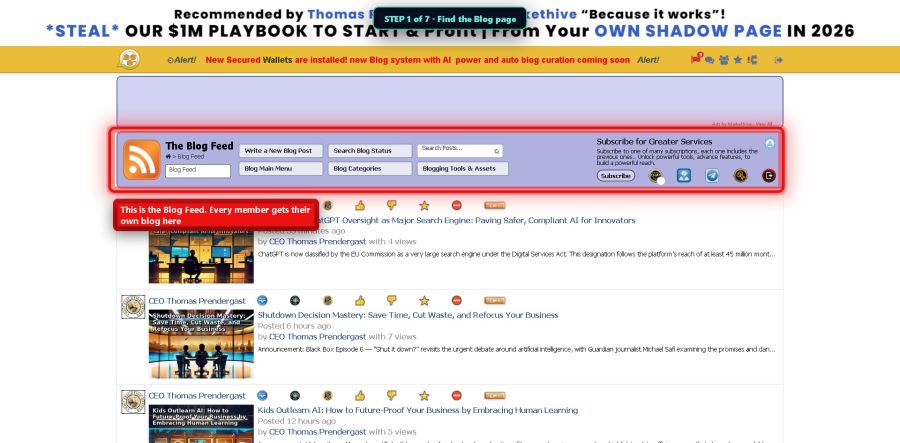
Step 1 — Find the Blog page

Go to markethive.com/blogs. This is the Blog Feed — stories from members all over the Hive. Yours will live here too.

Step 1 - the Blog Feed

Step 2 — Start your post

Click the button that says Write a New Blog Post. A fresh page opens up, ready for you.
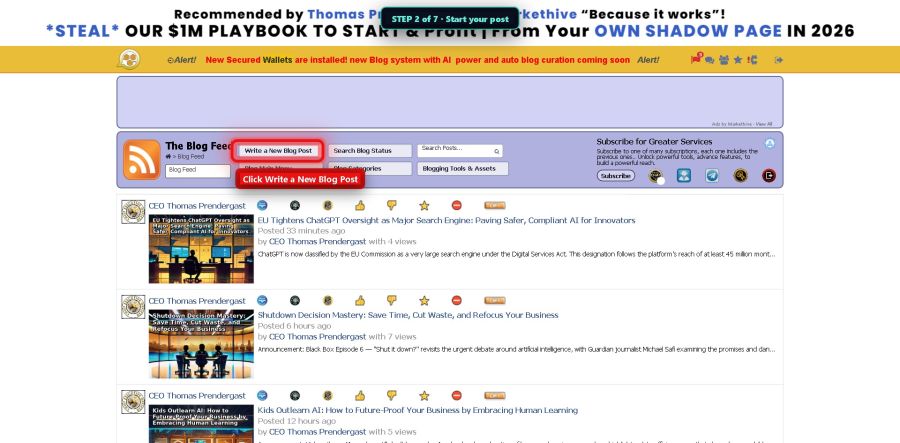
Step 2 - Write a New Blog Post

Step 3 — Give it a title

Say what your story is about in a few words. Something like My First Week on MarketHive. Simple and honest works best.
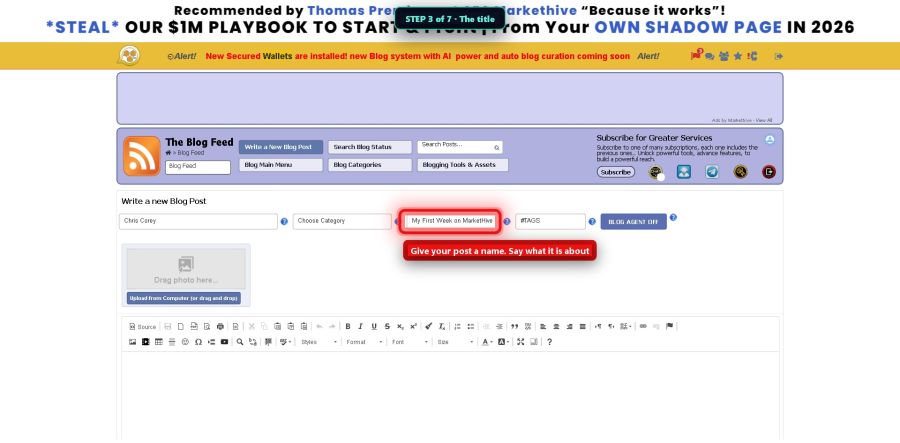
Step 3 - the title

Step 4 — Write your story

The big white box is yours. Talk like you talk. A few honest paragraphs beat a fancy essay every time. Tell people what you did, what you learned, or what you're building.
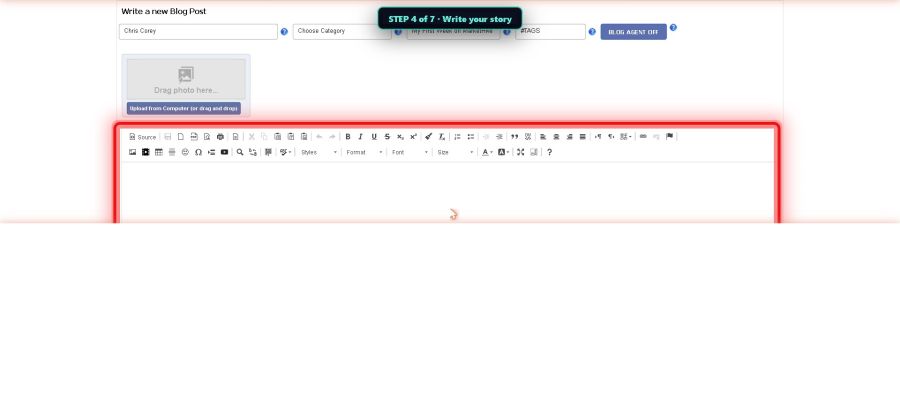
Step 4 - write your story

Step 5 — Add your cover picture

Click Upload from Computer and pick a picture. This becomes your post's cover, and posts with pictures get far more readers.
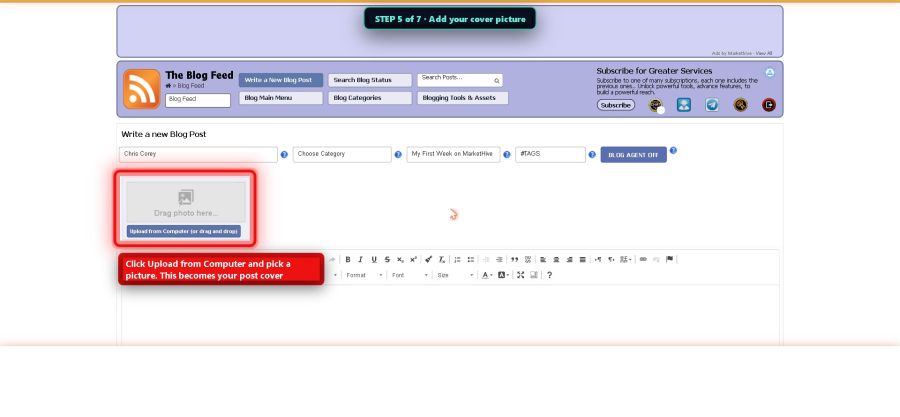
Step 5 - cover picture

Step 6 — Pick a category

The little menu called Choose Category tells MarketHive what your story is about, so the right people can find it. Pick the one that fits best.
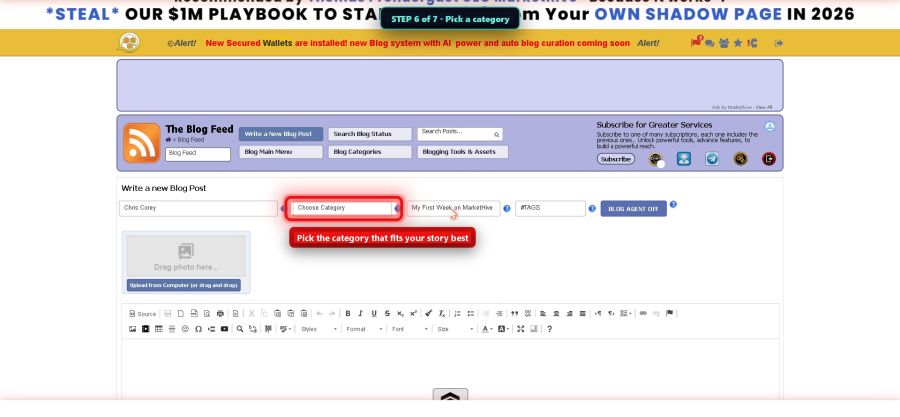
Step 6 - pick a category

Step 7 — Publish it

Click the blue Publish button. Here's the best part: your story is now a real web page on the internet, with its own address. Google can find it. You can share the link anywhere — email, Facebook, a text message. It works for you around the clock.


Step 7 - Publish
Do this today: Write one short post about why you joined MarketHive. Three paragraphs is plenty. Add one picture and hit Publish. One story a week, and in a year you have a library with your name on it.
Next picture guide: Run Your Group's Meeting Room. · The Hive Academy · Chris Corey, CTO · S407
Joseph Stasaitis Thanks, Chris!
September 7, 2026 at 3:35pm











