
x
Black Bar Banner 1
x

NEW: About Me Look — turn on a full-width dark About Me from your profile Configuration (Profile Page Upgrade). The Academy, profile feeds and Media Feed now read like the News Feed. See Subscriptions »

New: AI Blog Autopilot — free for the next 30 days. Switch it on by November 15th »

NEW: Smart Mail is live — free for every member. Send broadcasts, build lists and run autoresponders. Open Smart Mail »

New training: The Campaign Map. Watch it now »

A+ A−
Ads by Markethive - View All
The Blog Feed
The Blog Feed
» Blog Feed
Write a New Blog Post
Search Blog Status
Most Viewed
Most Recent
Most Shared
Alphabetical
Markethive Blog (default)
My Blog Posts
Friends' Blogs
Blog Categories
All
Advertising
Blockchain & Cryptocurrency
Business Development
Diet & Weight Loss
Environmental
Health and Wellness
History and Culture
Home and Garden
Marketing
Mentoring & Training
Money & Finance
Other
Political
Prayer & Religion
Programming & Technical
Real Estate
Search Engine Optimization
Social Media
Spirituality
Sports & Recreation
Transport
Travel & Events
Website Design
Blogging Tools & Assets
My Blog Info
Members Subscribed to You
Blogs You Are Subscribed To
Website Widget
Wordpress Plugin
Subscribe for Greater Services
Subscribe to one of many subscriptions, each one includes the previous ones.. Unlock powerful tools, advance features, to build a powerful reach.
 

MarketHive Academy: 17 Video Lessons, 14 Reading Guides, and What Comes Next

Posted by Chris Corey on September 29, 2026 - 8:45pm Edited 9/29 at 8:45pm


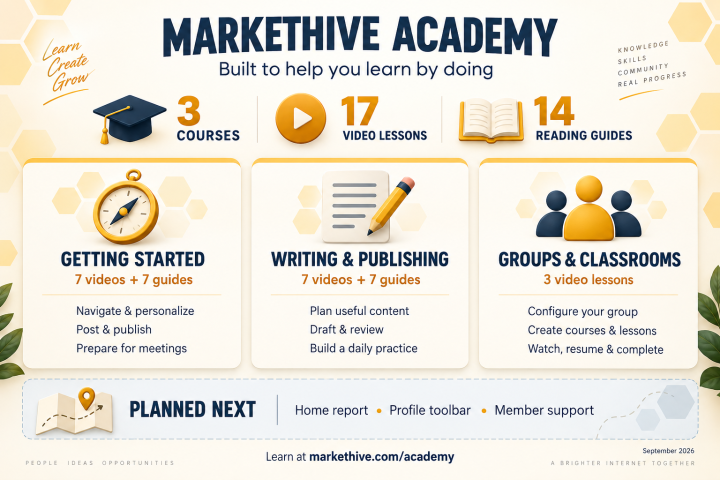
MarketHive Academy: three courses, 17 video lessons and 14 reading guides, with home report, profile toolbar and member support planned next.

By Chris Corey, Chief Technology Officer, MarketHive

Learning a platform should be part of using it. You should be able to find the tool you need, see how it works, and try it for yourself without having to piece together instructions from scattered posts.

That is what we have been building with MarketHive Academy. I want to give you a clear update on what is available today, what each course covers, and where we are taking the training next.

As of September 29, 2026, the Academy has three published courses, 17 video lessons, and 14 reading guides. That is 31 learning resources: the first two courses each pair seven videos with seven written guides, and the third contains three videos.

One home for official MarketHive training

Open GO TO → Academy, or visit MarketHive Academy.

The Academy gives our official how-to training a dedicated home, with courses, lesson navigation, progress tracking, and the ability to return to your learning. We refreshed the written material for current MarketHive use and preserved the original source posts.

The videos use my narration, current interface screenshots, and red focus outlines to make the controls easier to follow. The lessons are short—roughly a minute and a half to just over two minutes—so you can learn one task and then practice it.

Course 1: Getting Started with MarketHive

This is the starting point for getting comfortable with the tools members use every day. It includes seven videos and seven companion reading guides:

  1. Post, Boost, Push and Lift on the News Feed — Write a post, add a picture, choose your audience, and find the different promotion controls.
  2. Make MarketHive Easier to Read with A+ and A- — Find the text-size controls and adjust the page for comfortable reading.
  3. Find Your Way Around MarketHive with Go to — Navigate feeds, people, live destinations, tools, business shortcuts, and account help.
  4. Control Your Feed: Algorithm and Blocking — Understand where feed preferences and blocking controls live, and check what each setting affects.
  5. Write, Picture and Publish a MarketHive Blog Post — Choose the right destination and category, add your title and picture, review audience settings, and save a draft or publish.
  6. Your Profile Header, Photo and About Me — Find the controls for your cover, profile photo, biography, and social links.
  7. Find and Prepare Your Group Meeting Room — Locate the room and check the waiting screen, microphone, camera, and settings before joining. This lesson covers entry preparation; live hosting controls are a separate topic.

Explore Getting Started with MarketHive.

Course 2: MarketHive Writing and Publishing Practice

Knowing where the editor is is only part of the work. The next step is developing a repeatable way to prepare useful content, check it, and publish it in the right place.

This course also includes seven videos and seven companion reading guides:

  1. Prepare a Writing Reference for MarketHive — Gather accurate facts and useful background before drafting.
  2. Use a Repeatable MarketHive Blog Checklist — Work through the editor fields, article review, and publication settings consistently.
  3. Turn One Idea into a MarketHive Post and Blog — Develop a short feed post and a longer article from one useful idea.
  4. Prepare Useful Replies to MarketHive Members — Answer clearly, check the facts, and protect private information.
  5. Use a Daily MarketHive Review Checklist — Review replies, drafts, and your next learning step.
  6. Review AI-Assisted Content Before Publishing — Check accuracy, privacy, destination, audience, and the final publishing action.
  7. Your First Week of MarketHive Publishing Practice — Follow a practical seven-day plan to put these habits to work.

AI drafting is optional in this course. The focus is on your judgment: what you want to say, whether it is accurate, and whether it is ready to share. You review and publish the work yourself.

Explore Writing and Publishing Practice.

Course 3: Groups and Classrooms

We have also created three video lessons for group administrators, course creators, and learners:

  1. Group Administration: Basic Info and Newsfeed Configuration — Find the administration menu and understand group information, visibility, membership, posting, and comment controls. This walkthrough covers those two panels and stops before the older Landing Page editor.
  2. Create and Publish Classroom Courses and Video Lessons — Create a course, organize modules, upload video drafts, edit lesson details, and publish finished training.
  3. Watch, Resume and Complete Academy Lessons — Find a course, use the player, return to your learning, and mark lessons complete. The walkthrough also introduces lesson filters, quizzes, sequential lessons, and reading guides.

There is an important distinction here: Hive Academy is our official training for using MarketHive. Group Classrooms are the separate spaces for a group's own training. We have also added protection for the Hive Academy name to help keep that distinction clear.

Explore Groups and Classrooms.

What comes next

The next planned coverage includes the home report, profile toolbar, and member support. We will verify those workflows against the current platform as the lessons are developed.

We also have a preservation review of eight earlier training videos on the follow-up list, so existing material can be accounted for as the Academy grows. Further group-administration training will follow the current tools as they are verified; the older Landing Page workflow is not part of the completed new walkthrough.

These are next steps, not additional lessons being announced as live today. We will share their availability as they are completed.

Start with one task

My goal as CTO is to make MarketHive easier to use in practice. Training should help you do something: publish a better post, complete your profile, understand your feed, organize a classroom, or prepare for a group meeting.

Choose one lesson, watch it, and try the task in your own account. Use the written guide when you want to go at your own pace.

Open MarketHive Academy and choose your first course.

Tell us in the comments which MarketHive task you would like us to teach next.