x




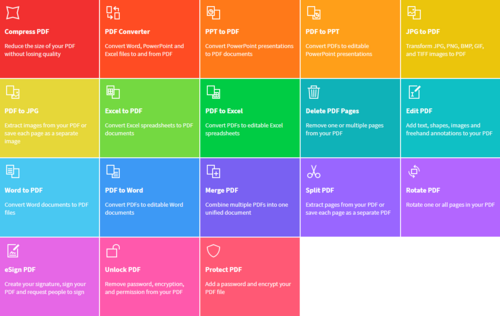
I have used SmallPDF for a couple of years now and found it to be fast and effective.
Smallpdf provides you with an online PDF application that lets you do all basic PDF tasks and processes, such as converting PDF files to various formats and vice versa, splitting and merging PDF documents, and compressing PDF files to name a few. It converts PDF files to all Microsoft Office file formats (and vice versa), including Word, Excel, and PowerPoint.
Used by more than 20 million individuals and over 100,000 businesses from all over the world, Smallpdf also comes with a number of security functions like digital signature and password protection to enhance the security of the documents processed within the system. To ensure data security, Smallpdf uses a bank-level 256-bit SSL encryption in every file transfer and all files are automatically deleted from their servers.
Smallpdf is built with your ease of use in mind. It is designed to enable you to do PDF-related tasks without having to download or install anything on your computer. The free version alone packs a huge punch, offering basic functionalities that you would need or demand from a basic PDF platform. Integrations with Google Drive and Dropbox allow for seamless, smooth, and dynamic PDF processes. Drag and drop functionality makes it easy for you to perform conversion, splitting, merging, and more without breaking a sweat.
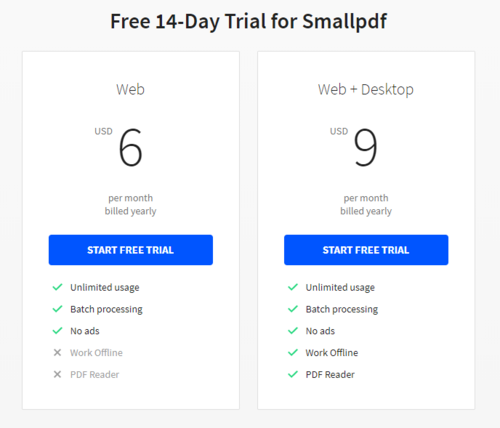
Personally, I have only used the free version as I never had the need to upgrade. If you try it and like it, they do have a free 14-day trial you can sign up for before upgrading to their Enterprise option, details below.
Excerpt from : https://reviews.financesonline.com/p/smallpdf/