
x
Black Bar Banner 1
x

NEW: About Me Look — turn on a full-width dark About Me from your profile Configuration (Profile Page Upgrade). The Academy, profile feeds and Media Feed now read like the News Feed. See Subscriptions »

New: AI Blog Autopilot — free for the next 30 days. Switch it on by November 15th »

NEW: Smart Mail is live — free for every member. Send broadcasts, build lists and run autoresponders. Open Smart Mail »

New training: The Campaign Map. Watch it now »

A+ A−
Ads by Markethive - View All
The Blog Feed
The Blog Feed
» Blog Feed
Write a New Blog Post
Search Blog Status
Most Viewed
Most Recent
Most Shared
Alphabetical
Markethive Blog (default)
My Blog Posts
Friends' Blogs
Blog Categories
All
Advertising
Blockchain & Cryptocurrency
Business Development
Diet & Weight Loss
Environmental
Health and Wellness
History and Culture
Home and Garden
Marketing
Mentoring & Training
Money & Finance
Other
Political
Prayer & Religion
Programming & Technical
Real Estate
Search Engine Optimization
Social Media
Spirituality
Sports & Recreation
Transport
Travel & Events
Website Design
Blogging Tools & Assets
My Blog Info
Members Subscribed to You
Blogs You Are Subscribed To
Website Widget
Wordpress Plugin
Subscribe for Greater Services
Subscribe to one of many subscriptions, each one includes the previous ones.. Unlock powerful tools, advance features, to build a powerful reach.

Picture Guide 6: Make the Text Your Size - the A+ and A- Buttons

Posted by Christopher Corey on September 02, 2026 - 11:49pm


PICTURE GUIDES · THE TEXT SIZER · THE HIVE ACADEMY

Make the Text Your Size — the A+ and A− Buttons

Four little steps. Real pictures of the real screen. The red ring shows you exactly where to click.

Hi, I'm Chris — the Chief Technology Officer here at MarketHive. If the words on your screen ever feel too small, this guide is for you. MarketHive now has text size buttons built right into the page. No browser tricks, no settings menus — two buttons, and the whole page grows.

Watch it in under a minute, or scroll for the pictures:

Step 1 — Find the A+ and A− buttons

Go to your News Feed. Look at the far right edge of the blue band, next to the round icons. See the two little round buttons stacked on top of each other? A+ on top, A− below it. Those are your text size controls.

Step 1 - find the A+ and A-minus buttons

Step 2 — Click A+ to grow the text

Click A+ once, and everything below gets one step bigger — the words AND the pictures, together. Click it again for another step. Five clicks takes it half again as big. No squinting, no hunting for your glasses.
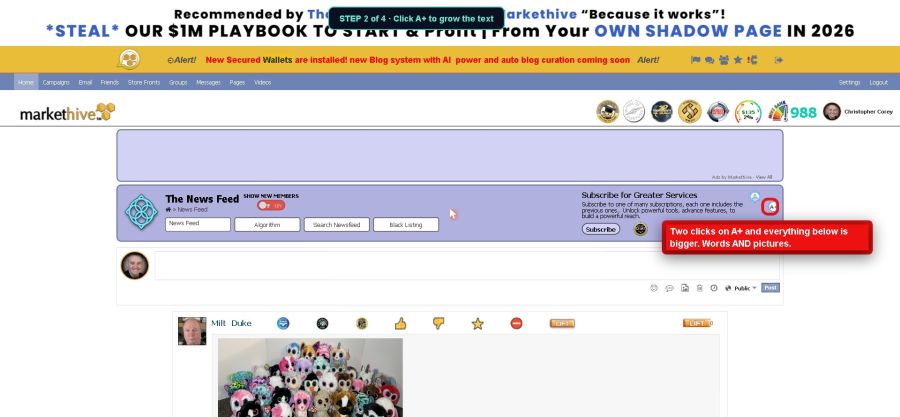
Step 2 - click A+ to grow the text

Step 3 — Click A− to shrink it back

Too big? Click A− and it steps right back down. It always stops at normal size, so you can never make it too small. Play with it until it feels right to you. You cannot break anything.
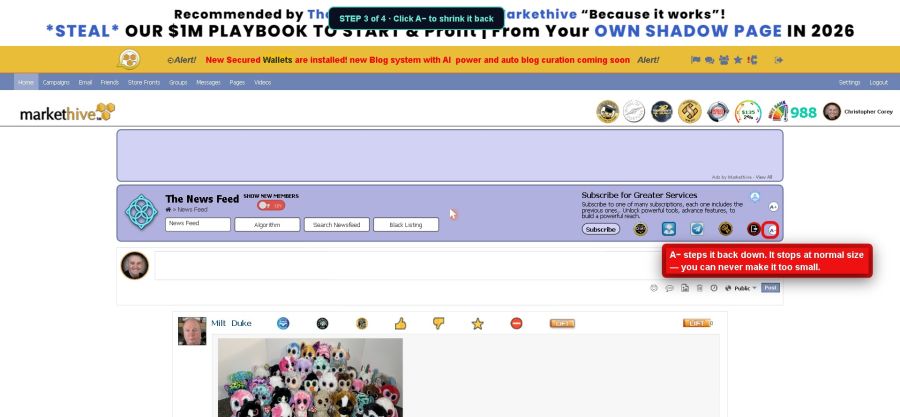
Step 3 - click A-minus to shrink it back

Step 4 — They're everywhere, and they remember

These buttons live all over MarketHive: the News Feed, the Blogs page, every blog post, and group pages too. And here's the nice part — each one remembers your choice on your own device. Set the feed bigger on your computer, and it stays bigger every time you come back. Your phone keeps its own setting. Nobody else's screen changes — only yours.
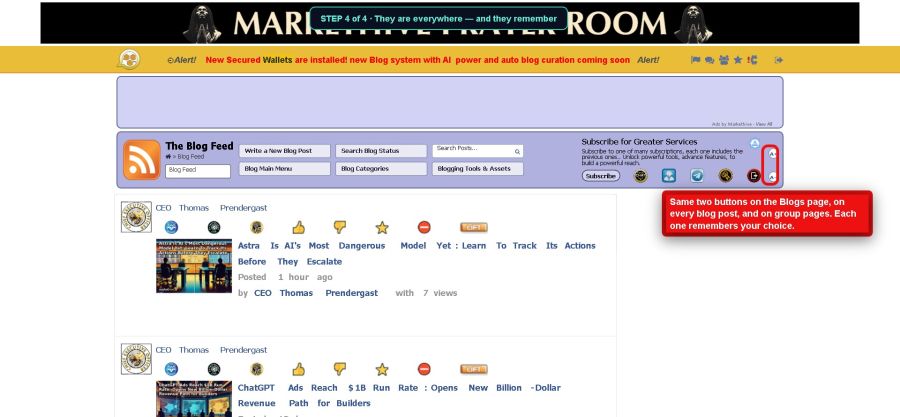

Step 4 - the buttons are on every section
Do this today: Go to your News Feed and click A+ twice. Read one post. If it feels better, leave it — MarketHive will remember. That's the whole assignment.
More picture guides are waiting in The Hive Academy · Chris Corey, CTO · S413
Melody Christie Super helpful update!
September 5, 2026 at 5:58am
Venable Dance The font size is so important, this is a very important upgrade and ease on the eyes. "Looking Good".
September 4, 2026 at 9:28pm
CARO All the upgrades are so exciting! Specially the font size...thank you!
September 4, 2026 at 12:39am
Milen Sokolov Благодаря за информацията ,която е много е полезна !
September 3, 2026 at 5:34pm
Simon Keighley That's a valuable upgrade - giving users control over text size makes browsing the platform much easier on the eyes. Thanks, Chris.
September 3, 2026 at 9:13am
Zsolt Pasztor Thanks for informing us.
September 3, 2026 at 3:09am