
x
Black Bar Banner 1
x

NEW: About Me Look — turn on a full-width dark About Me from your profile Configuration (Profile Page Upgrade). The Academy, profile feeds and Media Feed now read like the News Feed. See Subscriptions »

New: AI Blog Autopilot — free for the next 30 days. Switch it on by November 15th »

NEW: Smart Mail is live — free for every member. Send broadcasts, build lists and run autoresponders. Open Smart Mail »

New training: The Campaign Map. Watch it now »

A+ A−
Ads by Markethive - View All
The Blog Feed
The Blog Feed
» Blog Feed
Write a New Blog Post
Search Blog Status
Most Viewed
Most Recent
Most Shared
Alphabetical
Markethive Blog (default)
My Blog Posts
Friends' Blogs
Blog Categories
All
Advertising
Blockchain & Cryptocurrency
Business Development
Diet & Weight Loss
Environmental
Health and Wellness
History and Culture
Home and Garden
Marketing
Mentoring & Training
Money & Finance
Other
Political
Prayer & Religion
Programming & Technical
Real Estate
Search Engine Optimization
Social Media
Spirituality
Sports & Recreation
Transport
Travel & Events
Website Design
Blogging Tools & Assets
My Blog Info
Members Subscribed to You
Blogs You Are Subscribed To
Website Widget
Wordpress Plugin
Subscribe for Greater Services
Subscribe to one of many subscriptions, each one includes the previous ones.. Unlock powerful tools, advance features, to build a powerful reach.

Picture Guide 2: Control Your Feed - the Algorithm and Blocking

Posted by Christopher Corey on September 01, 2026 - 3:39am


PICTURE GUIDES · THE NEWSFEED · THE HIVE ACADEMY

Control Your Feed — the Algorithm and Blocking

Seven little steps. Real pictures of the real screen. The red ring shows you exactly where to click.

Hi, I'm Chris — the Chief Technology Officer here at MarketHive. Other networks hide their algorithm and decide for you. MarketHive hands you the steering wheel. This guide shows you where it is.

Step 1 — Find the Algorithm button

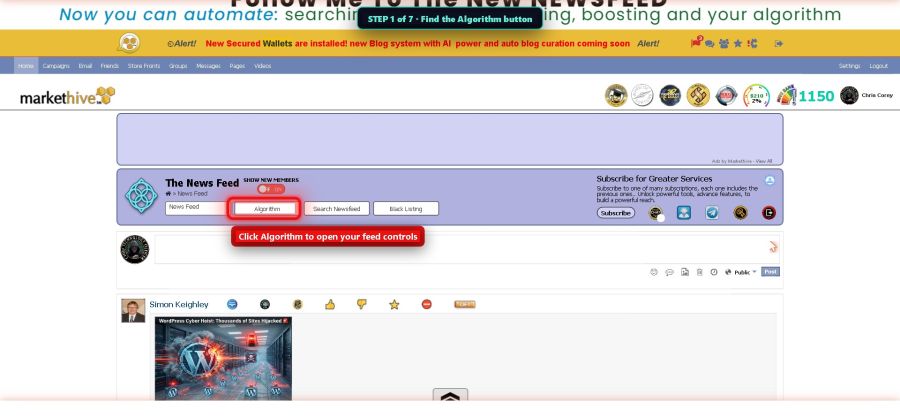
Go to your News Feed. Right above the writing box there is a row of buttons. The one in the ring says Algorithm. Click it. A control panel opens up.

Step 1 - the Algorithm button

Step 2 — Mute words you don't want

See the box called Meta Words Exclusion? Type a word you are tired of seeing — then click ADD WORD. Posts with that word stop showing up in your feed. It's like a mute button for topics.
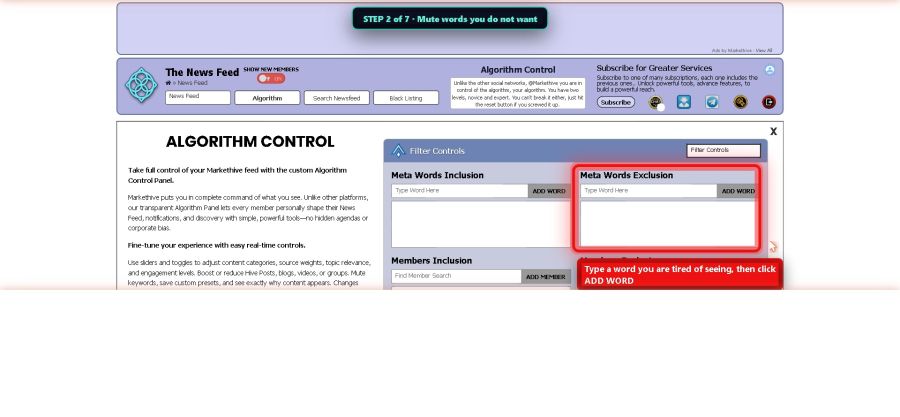
Step 2 - mute words

Step 3 — See more of the people you like

The box called Members Inclusion works the other way. Search for a member whose posts you enjoy and click ADD MEMBER. Now their posts show up more often. Your feed, your friends, your choice.
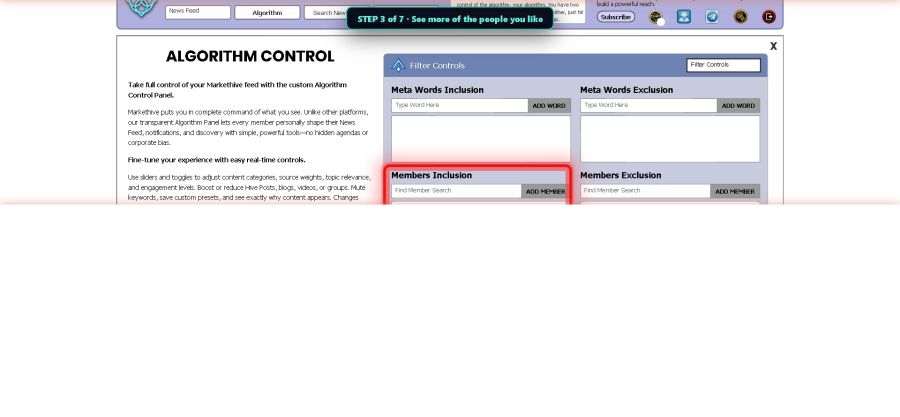
Step 3 - see more of who you like

Step 4 — The expert sliders (only if you want to)

At the top right of the panel there is a little menu. Switch it to Algorithm Control and you get the expert view: sliders that tell the feed what matters most to you. Drag them any way you like. If you make a mess, click Reset to Default and everything goes back to normal. You cannot break it.
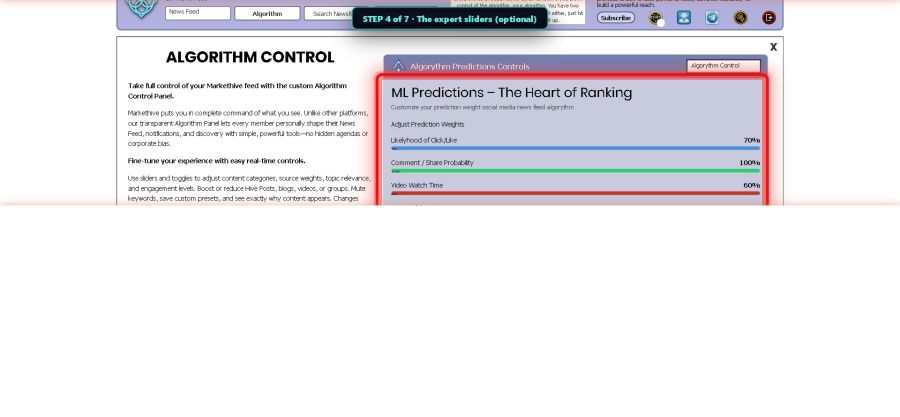
Step 4 - the expert sliders

Step 5 — Find the Black Listing button

Sometimes the problem isn't a topic — it's a person. On the same row of buttons, click Black Listing. This opens the blocking controls.
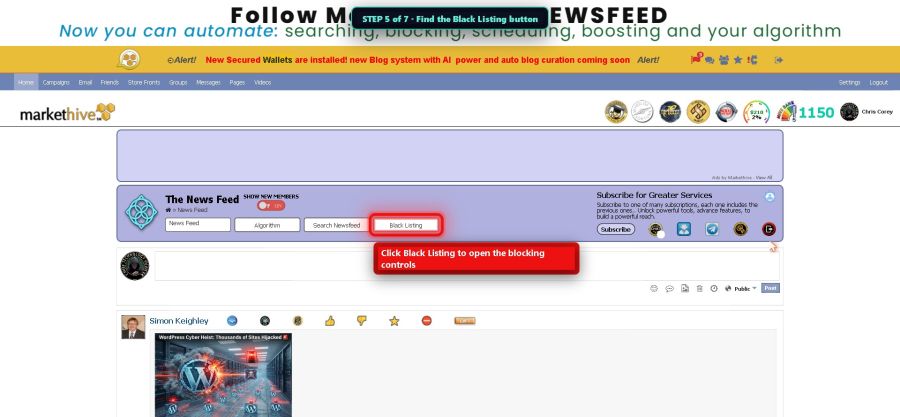
Step 5 - the Black Listing button

Step 6 — Choose your blocking level

MarketHive gives you five levels, from mild to total. Block Messages just stops their messages. Block Requests stops friend requests. Block Invites stops group invites. Block Comments stops them commenting on your posts. And Full System Block makes you invisible to each other completely. Read the little descriptions and pick how much peace you want.
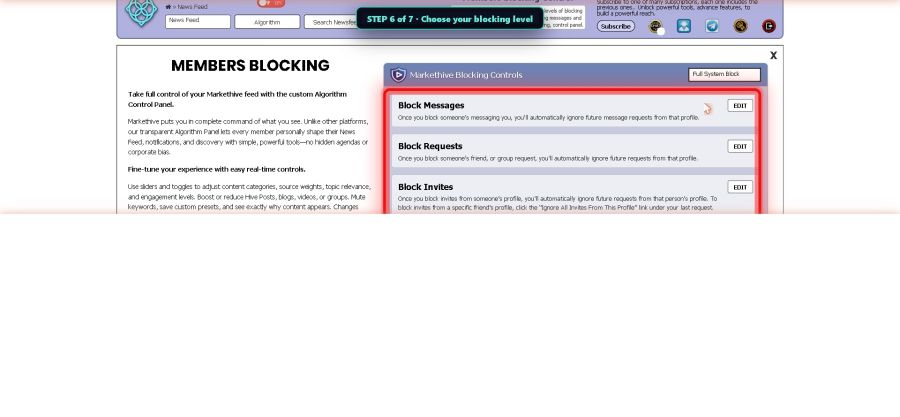
Step 6 - the five blocking levels

Step 7 — Add the person

Click EDIT next to the level you picked. A little card opens. Click Add to Blocked Messages (or whichever level you chose), type their name, and you're done. You can also see your blocked list here — and unblock anyone later if you change your mind. Nothing is forever.
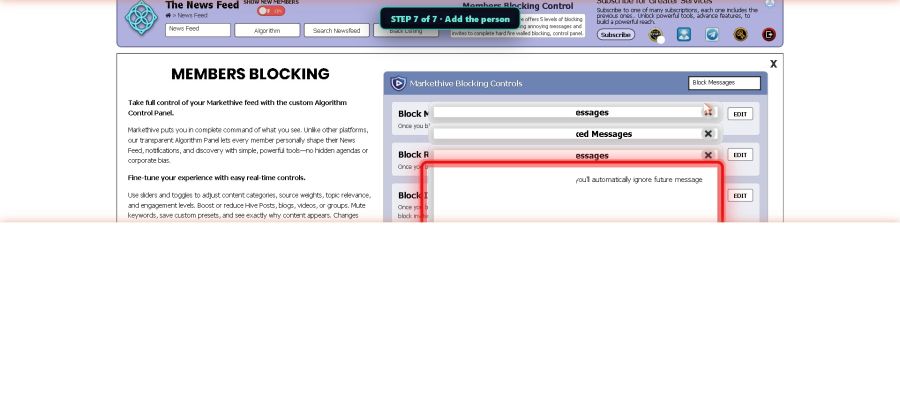

Step 7 - add the person
Do this today: You don't have to block anybody. Just open the Algorithm panel and add one word you never want to see again. That's the whole assignment. Your feed gets a little bit better today.
Next picture guide: The Blog System. · The Hive Academy · Chris Corey, CTO · S407
Richard Garcia Did the first assignment.
September 1, 2026 at 7:17pm