x





MicroStrategy founder Michael Saylor with Bitcoin laser eyes. Image: Michael Saylor/Twitter
Employees of business software company MicroStrategy can now receive Bitcoin payments to their corporate email addresses, MicroStrategy co-founder and executive chairman Michael Saylor revealed during the Cafe Bitcoin Twitter Spaces on Monday.
It might sound like a magical feat, but anyone can set one up. We'll show you how.
The Lightning Network, Bitcoin's speedier and more scalable cousin, fixes Bitcoin's scalability problems. Traditionally, when someone wants to receive a Lightning payment, they generate a Lightning invoice—a long scrambled string of characters that isn't human-readable.
To counter this, The Lightning Address standard is spreading across the industry, replacing the long, ugly invoice with what looks like a familiar email address.
As shown on The Lightning Address website, a number of Lightning services across the industry offer a way to easily set up one of these addresses, such as Zebedee, Alby, and Breez. Each service has its own unique domain—take your pick.
We'll use Bitcoin gaming app Zebedee, one of the more vocal proponents of the Lightning address.
When you install Zebedee to your phone, right off the bat it asks you to create a "gamertag," which is simply a Lightning Address by another name.
(6).png)
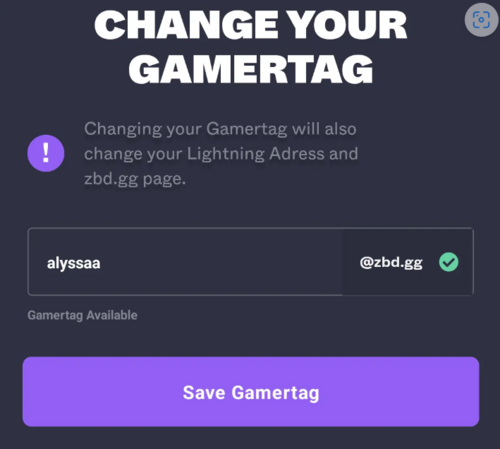
Select a name and—voilà! You've created a Lightning Address. It's as easy as that.
It’s important to note that since the Lightning industry is still blooming, the Lightning Address can't be used everywhere. The Lightning Address website features a list of Lightning wallets and services that support sending or receiving payments with a Lightning Address.
If you want to get really fancy, it's also possible to add Lightning support to your own personal domain, like Saylor did with MicroStrategy.com. (Note that you have to own the domain in order to be able to do this. It won't work for a gmail.com email, for instance.)
Setting this up is also pretty easy, as long as you have the ability to upload files to your website server. Lightning chrome extension Alby recently walked through the steps of how to do so on Twitter.
First, install the Alby browser extension, available on Chrome and Firefox, and set up an account with Alby. At the bottom of the account creation page, you’ll create a new Lightning Address with them.
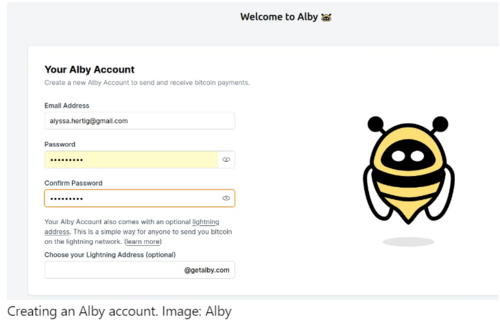
After that, go here: https://getalby.com/.well-known/lnurlp/<USERNAME>. For instance, my username is “alyssa” so I went to https://getalby.com/.well-known/lnurlp/alyssa
If all is well, your page will look something like this:
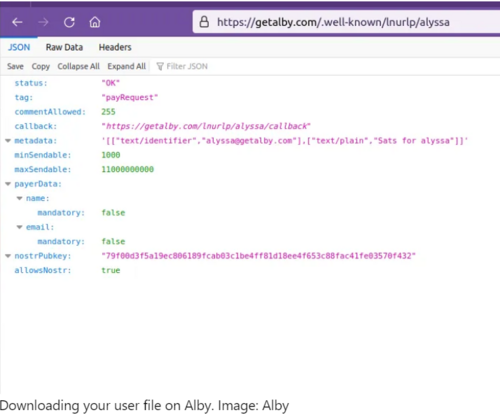
Downloading your user file on Alby. Image: Alby
You then download the file locally so you can use it in the next step by clicking “save” in the top left corner. Delete “.json” at the end, so the file name is just your username.
When that’s set, upload this file to the same location on your own website server: For example, if your domain is https://bitcoinrulez.com, then you'll want to upload the file to https://bitcoinrulez.com/.well-known/lnurlp/<USERNAME>
And that’s it! You can now try to send a Lightning payment to an email at that domain and check to see if it works. If you followed the steps correctly, you can now have folks send sats right to your email address just like Michael Saylor.
DISCLAIMER
THE VIEWS AND OPINIONS EXPRESSED BY THE AUTHOR ARE FOR INFORMATIONAL PURPOSES ONLY AND DO NOT CONSTITUTE FINANCIAL, INVESTMENT, OR OTHER ADVICE.
.png)